



教程介绍
很多小伙伴搭建的wordpress并且用了类似子比的厚重主题,在ITdog就行快速网站测试的时候直接就宕机了,我们这偏教程来教你有效的屏蔽itdog上百个节点的测试访问
Nginx服务器(请将代码放置于配置文件的 server{} 节点中):
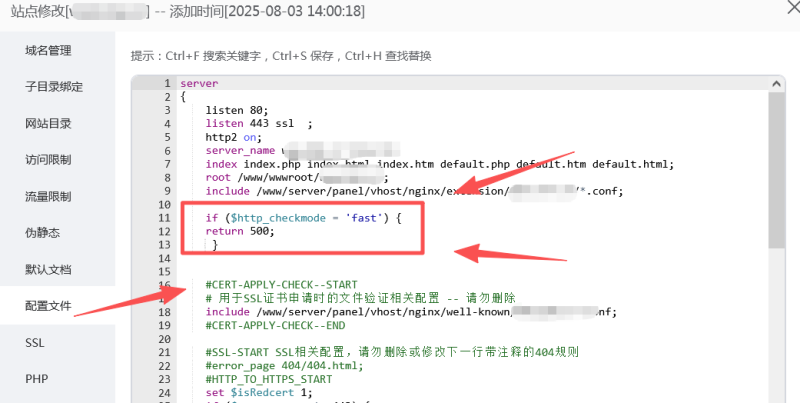
屏蔽快速测试模式:
if ($http_checkmode = 'fast') {
    return 500;
}
屏蔽缓慢测试模式:
if ($http_checkmode = 'slow') {
    return 500;
}
将以上代码根据自己需求选择一个复制到Nginx站点配置文件即可,例:
![图片[1]-屏蔽ITDOG的网站测速带来的压力-OE源码网](https://www.2oe.cn/wp-content/uploads/2025/11/4c9ba55492065cc3ebb8031ee20815c2-1024x515.png)
IIS服务器(IIS7.5及以上,请将代码放置于配置文件的<rewrite><rules>节点中):
屏蔽快速测试模式:
<rule name="itdog_filter" patternSyntax="Wildcard" stopProcessing="true">
    <match url="*" />
    <conditions>
        <add input="{HTTP_checkmode}" pattern="fast" />
    </conditions>
    <action type="CustomResponse" statusCode="500" statusReason="ITDOG filter" statusDescription="ITDOG filter"/>
</rule>
屏蔽缓慢测试模式:
<rule name="itdog_filter" patternSyntax="Wildcard" stopProcessing="true">
    <match url="*"/>
    <conditions>
        <add input="{HTTP_checkmode}" pattern="slow" />
    </conditions>
    <action type="CustomResponse" statusCode="500" statusReason="ITDOG filter" statusDescription="ITDOG filter"/>
</rule>
屏蔽所有模式:
<rule name="itdog_filter" patternSyntax="Wildcard" stopProcessing="true">
    <match url="*" />
    <conditions logicalGrouping="MatchAny">
        <add input="{HTTP_checkmode}" pattern="fast" />
        <add input="{HTTP_checkmode}" pattern="slow" />
    </conditions>
    <action type="CustomResponse" statusCode="500" statusReason="ITDOG filter" statusDescription="ITDOG filter"/>
</rule>
将以上代码根据需求选择一个复制到IIS站点配置文件(web.config)中即可(注意:IIS需要启用URL重写功能)
Apache服务器(将代码放置在站点根目录下的.htaccess文件中):
屏蔽快速测试模式:
RewriteEngine On
RewriteCond %{HTTP:checkmode} ^fast$
RewriteRule ^ - [R=500]
屏蔽缓慢测试模式:
RewriteEngine On
RewriteCond %{HTTP:checkmode} ^slow$
RewriteRule ^ - [R=500]
屏蔽所有模式:
RewriteEngine On
RewriteCond %{HTTP:checkmode} ^fast$ [OR]
RewriteCond %{HTTP:checkmode} ^slow$
RewriteRule ^ - [R=500]
将以上代码根据需求选择一个复制到Apache站点根目录(.htaccess)中即可
© 版权声明
本站收集的资源仅供内部学习研究软件设计思想和原理使用,学习研究后请自觉删除,请勿传播,因未及时删除所造成的任何后果责任自负。
如果用于其他用途,请购买正版支持作者,谢谢!若您认为「2OE.CN」发布的内容若侵犯到您的权益,请联系站长邮箱:365813108@qq.com 进行删除处理。
本站资源大多存储在云盘,如发现链接失效,请联系我们,我们会第一时间更新。THE END



![最新29网课 | 小月模板开源源码[带货源]-OE源码网](https://www.2oe.cn/wp-content/uploads/2025/05/25862ff0f3cb2e48a72ed378b5307b2-800x379.png)






![最新29网课 | 小月模板开源源码[带货源]-OE源码网](https://www.2oe.cn/wp-content/uploads/2025/05/25862ff0f3cb2e48a72ed378b5307b2-1024x486.png)


暂无评论内容